
Magi-cut logo
Optimisation & Production Software
  • Fast
  • Accurate
  • Powerful
We're here to help
+44 (0)117 927 6353
  • Home
  • About
    • About Magi-Cut
    • About Cut Rite
  • V11
  • Applications
    • Magi-Cut Express
    • Magi-Cut Intro
    • Standard Optimiser
    • Professional Optimiser
    • Nesting Optimiser
    • Product & Quotes
    • Stock Control
  • Features
    • Edges & Laminating
    • CAD Drawing Interface
    • Parts Library
    • Destacking & Palletisation
    • Machining Interface
    • Pattern Amendment
    • Forms & Labels
    • Saw Interface
    • Import / Export
  • Cloud
    • Magi-Cut Cloud Member Login
  • FAQs
  • News
  • Support
    • Support Request
    • Software downloads
    • Support contract
    • Video Library
    • Online Help
    • OS & Hardware Requirements
  • Contact us
  • Steph test
** URGENT ** Windows 10 update 1803 may cause Cut Rite to stop working, Please see solution here.

** URGENT ** Windows 10 update 1803 may cause Cut Rite to stop working, Please see solution here.

Home > News > ** URGENT ** Windows 10 update 1803 may cause Cut Rite to stop working, Please see solution here.

To all users, please be aware of an issue with the update to Windows 10 (Update 1803) and single user keys.

This update has been on automatic update since the 8th May 2018.

Once Update 1803 is installed, Cut Rite may no longer open.The key details are not displayed on the startup screen

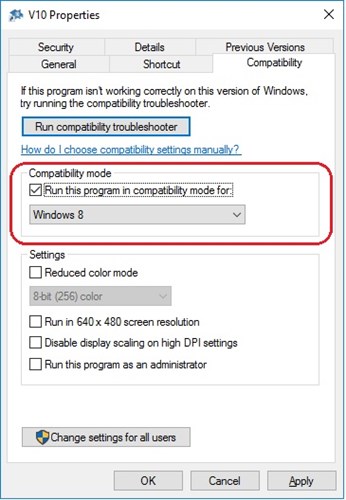
As a workaround, setting the compatibility mode of the Cut Rite desktop icon to Windows 8 enables to the software to operate.

To set the compatibility mode right click on the Cut Rite desktop icon and select Properties from the menu. In the Properties dialog select the Compatibility tab and enable Compatibility mode by setting 'Run this program in compatibility mode for:'. Select Windows 8 from the drop down menu. Select Ok to confirm and save the setting.
Recent News

Recent releases and updates

  • 13/08/2019 -  Magi-Cut Cloud - user login now added to free optimiser
  • 30/04/2019 -  Magi-Cut Cloud has been updated
  • 23/11/2018 -  Magi-Cut V11 released
  • 16/10/2018 -  Magi-Cut Cloud - Import/Export of part lists

Keep in touch

Contact us now. Contact us or follow us on Twitter and YouTube.

Keep in touch

Applications

From starter level to large scale production

Magi-Cut's range of applications lets you control your whole manufacturing process within just one software package.

Find Out More

Magi-Cut Support

Submit your support request here

If you have a question about the use of Magi-Cut, enter your support request here.

Find out more

Home

  • About
  • Applications
  • Features
  • News

Cloud & Downloads

  • Cloud Optimiser
  • Magi-Cut Express
  • Magi-Cut Intro
  • Software downloads

Support

  • Online Help
  • Support Request
  • Contact us
  • FAQs
  • Video Library

Follow us

  • Twitter
  • Youtube
Magi-cut logo
© Magi-Cut Software Ltd 2025
Privacy Policy | Terms & Conditions
    • Twitter
    • Youtube
Cookie Policy

Our website uses cookies to provide you with a better online experience. If you continue to use our site without changing your browser settings, we'll assume you are happy to receive cookies. Please read our cookie policy for more information.

Accept Decline